# 3.6  Camera

Model: lite-640t · Manual v1.0.2
Canonical: https://shop.skyflow.ca/learn/autel/evo-lite-enterprise/manuals/evo-lite-640t-v1-0-2/3-6-camera
Source: https://drive.google.com/file/d/1yQTDKasKxbvfVdANOx9bmlPYml-2dkCE/view
Updated: 2026-10-17

EVO Lite 640T Enterprise · SE V2 controller

The gimbal camera of the EVO Lite 6K Enterprise Aircraft is equipped with a 1-inch CMOS image sensor, capable of capturing stable 6K high-definition videos and 20 million pixels photos.

[PDF page 53, block 8](https://shop.skyflow.ca/learn/autel/evo-lite-enterprise/manuals/evo-lite-640t-v1-0-2/3-6-camera#p53-b8)

The gimbal camera of the EVO Lite 640T Enterprise Aircraft is equipped with a 1/2-inch CMOS image sensor, capable of capturing stable 48 million pixels photos and infrared photos of 640 x 512 resolution.

[PDF page 53, block 9](https://shop.skyflow.ca/learn/autel/evo-lite-enterprise/manuals/evo-lite-640t-v1-0-2/3-6-camera#p53-b9)

## 3.6.1  Camera differences

[PDF page 54, block 2](https://shop.skyflow.ca/learn/autel/evo-lite-enterprise/manuals/evo-lite-640t-v1-0-2/3-6-camera#p54-b2)

Aircraft Gimbal Camera

![Aircraft Gimbal Camera](https://shop.skyflow.ca/manuals/evo-lite-640t-v1-0-2/4405f4a91f5d535beb9d02cc.webp)

[PDF page 54, block 3](https://shop.skyflow.ca/learn/autel/evo-lite-enterprise/manuals/evo-lite-640t-v1-0-2/3-6-camera#p54-b3)

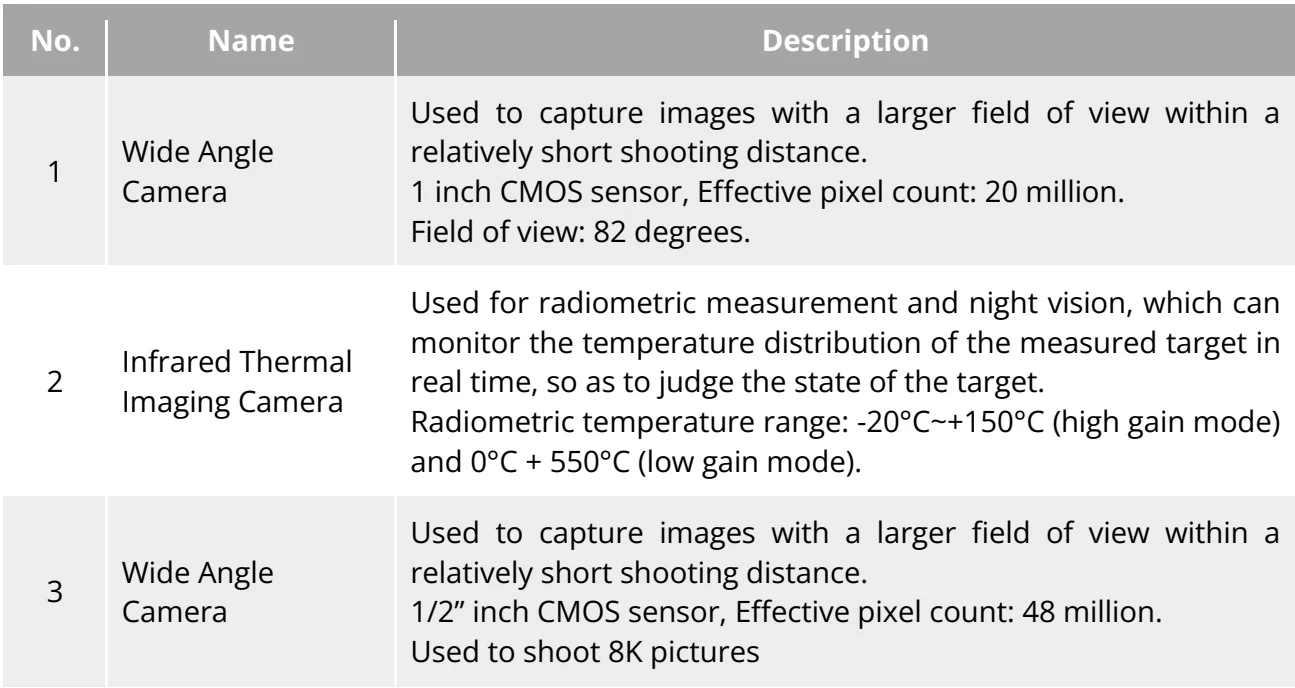
<table><tr><td>No.</td><td>Name</td><td>Description</td></tr><tr><td>1</td><td>Wide Angle Camera</td><td>Used to capture images with a larger field of view within a relatively short shooting distance.1 inch CMOS sensor, Effective pixel count: 20 million.Field of view: 82 degrees.</td></tr><tr><td>2</td><td>Infrared Thermal Imaging Camera</td><td>Used for radiometric measurement and night vision, which can monitor the temperature distribution of the measured target in real time, so as to judge the state of the target.Radiometric temperature range: -20°C~+150°C (high gain mode) and 0°C + 550°C (low gain mode).</td></tr><tr><td>3</td><td>Wide Angle Camera</td><td>Used to capture images with a larger field of view within a relatively short shooting distance.1/2&quot; inch CMOS sensor, Effective pixel count: 48 million.Used to shoot 8K pictures</td></tr></table>

![Table 3-7 Aircraft Gimbal Camera Details](https://shop.skyflow.ca/manuals/evo-lite-640t-v1-0-2/b5ae32f5c941f69036bb9468.webp)

[PDF page 54, block 6](https://shop.skyflow.ca/learn/autel/evo-lite-enterprise/manuals/evo-lite-640t-v1-0-2/3-6-camera#p54-b6)

<ul><li>Do not point the infrared thermal imaging camera at intensive energy sources such as the sun, lava, laser beams, and molten iron, to avoid damage to the infrared detector.</li><li>The temperature of the observation target should be less than 600 °C. Observing objects with temperatures above this limit may result in damage to the infrared detector.</li></ul>

![Manufacturer note](https://shop.skyflow.ca/manuals/evo-lite-640t-v1-0-2/bfb4376bb0b50392a921de9c.webp)

[PDF page 54, block 7](https://shop.skyflow.ca/learn/autel/evo-lite-enterprise/manuals/evo-lite-640t-v1-0-2/3-6-camera#p54-b7)

## 3.6.2  Camera operations

[PDF page 54, block 8](https://shop.skyflow.ca/learn/autel/evo-lite-enterprise/manuals/evo-lite-640t-v1-0-2/3-6-camera#p54-b8)

## RC Control

[PDF page 54, block 9](https://shop.skyflow.ca/learn/autel/evo-lite-enterprise/manuals/evo-lite-640t-v1-0-2/3-6-camera#p54-b9)

Right dial wheel: Used to adjust the zoom factor of the selected camera. Turn left to reduce the zoom factor, and turn right to increase the zoom factor.

[PDF page 54, block 10](https://shop.skyflow.ca/learn/autel/evo-lite-enterprise/manuals/evo-lite-640t-v1-0-2/3-6-camera#p54-b10)

Video recording/Shooting button: Short press the button to shoot a picture; press and hold this button to start/end recording video. When recording video, you may press the button to shooting a picture.

[PDF page 55, block 2](https://shop.skyflow.ca/learn/autel/evo-lite-enterprise/manuals/evo-lite-640t-v1-0-2/3-6-camera#p55-b2)

<ul><li>For the control operations of the RC, please refer to &quot;4.1.1 Remote Controller Components&quot; in Chapter 4.</li></ul>

![Manufacturer note](https://shop.skyflow.ca/manuals/evo-lite-640t-v1-0-2/cc2eb87f58774fe1fb0d58a5.webp)

[PDF page 55, block 3](https://shop.skyflow.ca/learn/autel/evo-lite-enterprise/manuals/evo-lite-640t-v1-0-2/3-6-camera#p55-b3)

## Flight Application Control

[PDF page 55, block 4](https://shop.skyflow.ca/learn/autel/evo-lite-enterprise/manuals/evo-lite-640t-v1-0-2/3-6-camera#p55-b4)

For details about control methods, please refer to “6.8 Camera Interfaces” in Chapter 6.

[PDF page 55, block 5](https://shop.skyflow.ca/learn/autel/evo-lite-enterprise/manuals/evo-lite-640t-v1-0-2/3-6-camera#p55-b5)