# 3.8  Flight Control System

Model: lite-640t · Manual v1.0.2
Canonical: https://shop.skyflow.ca/learn/autel/evo-lite-enterprise/manuals/evo-lite-640t-v1-0-2/3-8-flight-control-system
Source: https://drive.google.com/file/d/1yQTDKasKxbvfVdANOx9bmlPYml-2dkCE/view
Updated: 2026-10-17

EVO Lite 640T Enterprise · SE V2 controller

EVO Lite Enterprise Series multi-rotor drone achieves stable and convenient flight control through its built-in intelligent flight control system. The system supports a number of advanced functions, including auto-return, failsafe, and visual positioning system.

[PDF page 57, block 7](https://shop.skyflow.ca/learn/autel/evo-lite-enterprise/manuals/evo-lite-640t-v1-0-2/3-8-flight-control-system#p57-b7)

<table><tbody><tr><td>Module</td><td>Description</td></tr><tr><td>IMU</td><td>A three-axis gyroscope and a three-axis accelerometer measure acceleration and angular velocity.</td></tr><tr><td>Compass</td><td>Measures the geomagnetic field and provides reference information on the aircraft heading.</td></tr><tr><td>GNSS receiver</td><td>Receives global satellite navigation signals to measure longitude, latitude, and altitude.</td></tr><tr><td>Barometer</td><td>Measures atmospheric pressure and is used to determine the altitude of the aircraft.</td></tr><tr><td>Visual Perception System</td><td>Provides the aircraft with front, rear, and down obstacle awareness around the fuselage.</td></tr><tr><td>Ultrasonic sensor</td><td>Measures the distance between the aircraft and the ground.</td></tr></tbody></table>

![Table 3-9 Flight Control System](https://shop.skyflow.ca/manuals/evo-lite-640t-v1-0-2/ff4a1dca6fa3402f5a86d58f.webp)

[PDF page 57, block 9](https://shop.skyflow.ca/learn/autel/evo-lite-enterprise/manuals/evo-lite-640t-v1-0-2/3-8-flight-control-system#p57-b9)

## 3.8.1  Flight status

[PDF page 58, block 2](https://shop.skyflow.ca/learn/autel/evo-lite-enterprise/manuals/evo-lite-640t-v1-0-2/3-8-flight-control-system#p58-b2)

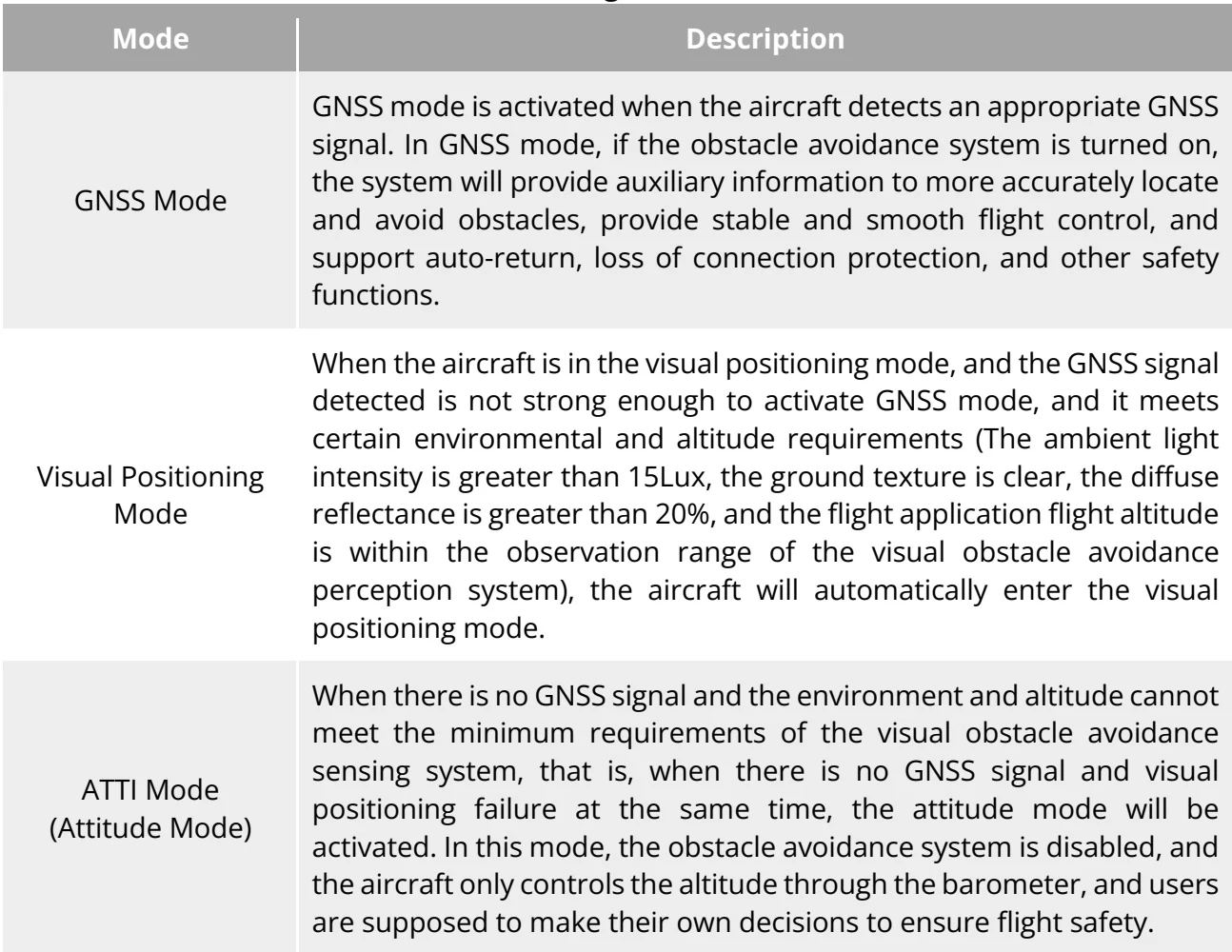
Depending on the availability of GNSS signals and flight conditions, the aircraft can automatically switch between three flight modes. For details, please refer to “6.3 Status Notification Bar” in chapter 6.

[PDF page 58, block 3](https://shop.skyflow.ca/learn/autel/evo-lite-enterprise/manuals/evo-lite-640t-v1-0-2/3-8-flight-control-system#p58-b3)

<table><tr><td>Mode</td><td>Description</td></tr><tr><td>GNSS Mode</td><td>GNSS mode is activated when the aircraft detects an appropriate GNSS signal. In GNSS mode, if the obstacle avoidance system is turned on, the system will provide auxiliary information to more accurately locate and avoid obstacles, provide stable and smooth flight control, and support auto-return, loss of connection protection, and other safety functions.</td></tr><tr><td>Visual Positioning Mode</td><td>When the aircraft is in the visual positioning mode, and the GNSS signal detected is not strong enough to activate GNSS mode, and it meets certain environmental and altitude requirements (The ambient light intensity is greater than 15Lux, the ground texture is clear, the diffuse reflectance is greater than 20%, and the flight application flight altitude is within the observation range of the visual obstacle avoidance perception system), the aircraft will automatically enter the visual positioning mode.</td></tr><tr><td>ATTI Mode (Attitude Mode)</td><td>When there is no GNSS signal and the environment and altitude cannot meet the minimum requirements of the visual obstacle avoidance sensing system, that is, when there is no GNSS signal and visual positioning failure at the same time, the attitude mode will be activated. In this mode, the obstacle avoidance system is disabled, and the aircraft only controls the altitude through the barometer, and users are supposed to make their own decisions to ensure flight safety.</td></tr></table>

![Table 3-10 Flight Status](https://shop.skyflow.ca/manuals/evo-lite-640t-v1-0-2/76f44a3364b6b394d8598667.webp)

[PDF page 58, block 5](https://shop.skyflow.ca/learn/autel/evo-lite-enterprise/manuals/evo-lite-640t-v1-0-2/3-8-flight-control-system#p58-b5)

<ul><li>If you have not fully mastered the flight control of the aircraft and the aircraft is in ATTI mode, please do not take off rashly.</li><li>If the aircraft is in visual positioning mode or attitude mode, the no-fly zone function of the geofencing system will be unavailable and please be cautious that do not enter restricted airspace.</li></ul>

![Manufacturer note](https://shop.skyflow.ca/manuals/evo-lite-640t-v1-0-2/a8893cf75706b889667abd41.webp)

[PDF page 58, block 6](https://shop.skyflow.ca/learn/autel/evo-lite-enterprise/manuals/evo-lite-640t-v1-0-2/3-8-flight-control-system#p58-b6)

<ul><li>When the aircraft is in the visual positioning mode, the maximum speed limit is 3 m/s in standard mode and 10 m/s in ludicrous mode.</li><li>In ATTI mode, the maximum speed of the aircraft in corresponding speed mode is not affected.</li></ul>

![Manufacturer note](https://shop.skyflow.ca/manuals/evo-lite-640t-v1-0-2/0060de2a6953754d8902c33e.webp)

[PDF page 58, block 7](https://shop.skyflow.ca/learn/autel/evo-lite-enterprise/manuals/evo-lite-640t-v1-0-2/3-8-flight-control-system#p58-b7)

## 3.8.2  Flight modes

[PDF page 59, block 2](https://shop.skyflow.ca/learn/autel/evo-lite-enterprise/manuals/evo-lite-640t-v1-0-2/3-8-flight-control-system#p59-b2)

The aircraft has varying flight performance in different flight modes. You can set the flight mode of the aircraft in the flight application. For more information, please refer to “ 6.3 Status Notification Bar” and “6.5.1 Flight Control Parameter Setting” in Chapter 6.

[PDF page 59, block 3](https://shop.skyflow.ca/learn/autel/evo-lite-enterprise/manuals/evo-lite-640t-v1-0-2/3-8-flight-control-system#p59-b3)

<table><tbody><tr><td>Flight Modes</td><td>Description</td></tr><tr><td>Slow</td><td>Forward, backward, left, and right: 3.0 m/s; Ascend: 3.0 m/s; Descend: 3.0 m/s.</td></tr><tr><td>Smooth</td><td>Forward, backward, left, and right: 5.0 m/s; Ascend: 3.0 m/s; Descend: 2.0 m/s.</td></tr><tr><td>Standard</td><td>Forward, backward, left, and right: 10.0 m/s; Ascend: 5.0 m/s; Descend: 3.0m/s.</td></tr><tr><td>Ludicrous</td><td>Forward, backward, left, and right: 18.0 m/s; Ascend: 6.0 m/s; Descend: 4.0m/s.</td></tr></tbody></table>

![Table 3-11 Flight Modes](https://shop.skyflow.ca/manuals/evo-lite-640t-v1-0-2/41b946ec56f27b03002e4113.webp)

[PDF page 59, block 5](https://shop.skyflow.ca/learn/autel/evo-lite-enterprise/manuals/evo-lite-640t-v1-0-2/3-8-flight-control-system#p59-b5)

<ul><li>The slow mode can also be regarded as novice mode. In this mode, the maximum flight altitude is 30 meters.</li><li>If you have not fully mastered the flight control of the aircraft, it is not recommended for you to switch toLudicrous mode.</li><li>When flying close to the ground, it is recommended to switch to smoothmode for safety.</li><li>When switching to Ludicrous mode, the obstacle avoidance function of the aircraft will become unavailable, and the aircraft will not automatically avoid surrounding obstacles during flight. Please pay attention to the surrounding environment when using it, and manually control the aircraft to avoid obstacles.</li><li>When switching to Ludicrous mode, its flight speed is greatly improved compared with Standard mode, so the braking distance in this mode will be correspondingly extended. You should maintain a braking distance of at least 40meters when operating the aircraft in this mode to ensure personal and flight safety.</li></ul>

![Manufacturer note](https://shop.skyflow.ca/manuals/evo-lite-640t-v1-0-2/a01cc7d52d7440d2dab8c0cb.webp)

[PDF page 59, block 6](https://shop.skyflow.ca/learn/autel/evo-lite-enterprise/manuals/evo-lite-640t-v1-0-2/3-8-flight-control-system#p59-b6)

## 3.8.3  Intelligent flight function

[PDF page 59, block 7](https://shop.skyflow.ca/learn/autel/evo-lite-enterprise/manuals/evo-lite-640t-v1-0-2/3-8-flight-control-system#p59-b7)

## Accurate Landing

[PDF page 59, block 8](https://shop.skyflow.ca/learn/autel/evo-lite-enterprise/manuals/evo-lite-640t-v1-0-2/3-8-flight-control-system#p59-b8)

The accurate landing function uses the downward binocular Visual Perception System of the aircraft to record the information at its take-off point. When the aircraft is returning to the home point or landing, vision algorithms are used to calculate the distance between the aircraft and

[PDF page 59, block 9](https://shop.skyflow.ca/learn/autel/evo-lite-enterprise/manuals/evo-lite-640t-v1-0-2/3-8-flight-control-system#p59-b9)

the take-off point in real time so as to make sure that the aircraft successfully lands at the takeoff point.

[PDF page 60, block 2](https://shop.skyflow.ca/learn/autel/evo-lite-enterprise/manuals/evo-lite-640t-v1-0-2/3-8-flight-control-system#p60-b2)

## Landing Protection

[PDF page 60, block 3](https://shop.skyflow.ca/learn/autel/evo-lite-enterprise/manuals/evo-lite-640t-v1-0-2/3-8-flight-control-system#p60-b3)

The landing protection function uses the downward Visual Perception System of the aircraft to create a depth image, and then calculates the flatness and angle of the depth image to detect whether the surface is flat enough for a safe landing.

[PDF page 60, block 4](https://shop.skyflow.ca/learn/autel/evo-lite-enterprise/manuals/evo-lite-640t-v1-0-2/3-8-flight-control-system#p60-b4)

## Intelligent Obstacle Avoidance

[PDF page 60, block 5](https://shop.skyflow.ca/learn/autel/evo-lite-enterprise/manuals/evo-lite-640t-v1-0-2/3-8-flight-control-system#p60-b5)

The intelligent obstacle avoidance function uses the combined observation results of the visual sensing system and the forward millimeter-wave radar sensing system of the aircraft to calculate the optimal flight path, achieving obstacle avoidance in multiple directions.

[PDF page 60, block 6](https://shop.skyflow.ca/learn/autel/evo-lite-enterprise/manuals/evo-lite-640t-v1-0-2/3-8-flight-control-system#p60-b6)