# 4.10  Selecting Stick Mode

Model: lite-640t · Manual v1.0.2
Canonical: https://shop.skyflow.ca/learn/autel/evo-lite-enterprise/manuals/evo-lite-640t-v1-0-2/4-10-selecting-stick-mode
Source: https://drive.google.com/file/d/1yQTDKasKxbvfVdANOx9bmlPYml-2dkCE/view
Updated: 2026-10-17

EVO Lite 640T Enterprise · SE V2 controller

## 4.10.1  Stick Modes

[PDF page 79, block 18](https://shop.skyflow.ca/learn/autel/evo-lite-enterprise/manuals/evo-lite-640t-v1-0-2/4-10-selecting-stick-mode#p79-b18)

When using the remote controller to operate the aircraft, you need to know the current stick mode of the remote controller and fly with caution.

[PDF page 79, block 19](https://shop.skyflow.ca/learn/autel/evo-lite-enterprise/manuals/evo-lite-640t-v1-0-2/4-10-selecting-stick-mode#p79-b19)

Three stick modes are available, that is, Mode 1, Mode 2 (default), and Mode 3.

[PDF page 79, block 20](https://shop.skyflow.ca/learn/autel/evo-lite-enterprise/manuals/evo-lite-640t-v1-0-2/4-10-selecting-stick-mode#p79-b20)

## Mode 1

[PDF page 80, block 2](https://shop.skyflow.ca/learn/autel/evo-lite-enterprise/manuals/evo-lite-640t-v1-0-2/4-10-selecting-stick-mode#p80-b2)

Mode 1

![Mode 1](https://shop.skyflow.ca/manuals/evo-lite-640t-v1-0-2/d1730ed777fe4be08e9bac67.webp)

[PDF page 80, block 3](https://shop.skyflow.ca/learn/autel/evo-lite-enterprise/manuals/evo-lite-640t-v1-0-2/4-10-selecting-stick-mode#p80-b3)

<table><tbody><tr><td>Stick</td><td>Move Up/Down</td><td>Move Left/Right</td></tr><tr><td>Left Command Stick</td><td>Controls the forward and backward movement of the aircraft</td><td>Controls the heading of the aircraft</td></tr><tr><td>R C Stiogicmhktmand</td><td>Controls the ascent and descent of the aircraft</td><td>Controls the left or right movement of the aircraft</td></tr></tbody></table>

![Table 4-10 Mode 1 Details](https://shop.skyflow.ca/manuals/evo-lite-640t-v1-0-2/d235d27c63eacd7804608004.webp)

[PDF page 80, block 6](https://shop.skyflow.ca/learn/autel/evo-lite-enterprise/manuals/evo-lite-640t-v1-0-2/4-10-selecting-stick-mode#p80-b6)

## Mode 2

[PDF page 80, block 7](https://shop.skyflow.ca/learn/autel/evo-lite-enterprise/manuals/evo-lite-640t-v1-0-2/4-10-selecting-stick-mode#p80-b7)

Mode 2

![Mode 2](https://shop.skyflow.ca/manuals/evo-lite-640t-v1-0-2/961f667e8759d69c0504fd7d.webp)

[PDF page 80, block 8](https://shop.skyflow.ca/learn/autel/evo-lite-enterprise/manuals/evo-lite-640t-v1-0-2/4-10-selecting-stick-mode#p80-b8)

<table><tbody><tr><td>Stick</td><td>Move Up/Down</td><td>Move Left/Right</td></tr><tr><td>Left Command Stick</td><td>Controls the ascent and descent of the aircraft</td><td>Controls the heading of the aircraft</td></tr></tbody></table>

![Table 4-11 Mode 2 Details](https://shop.skyflow.ca/manuals/evo-lite-640t-v1-0-2/f3b6e9c26e2accd553b5ad9f.webp)

[PDF page 80, block 11](https://shop.skyflow.ca/learn/autel/evo-lite-enterprise/manuals/evo-lite-640t-v1-0-2/4-10-selecting-stick-mode#p80-b11)

Right Command Stick

[PDF page 81, block 2](https://shop.skyflow.ca/learn/autel/evo-lite-enterprise/manuals/evo-lite-640t-v1-0-2/4-10-selecting-stick-mode#p81-b2)

Controls the forward and backward movement of the aircraft

[PDF page 81, block 3](https://shop.skyflow.ca/learn/autel/evo-lite-enterprise/manuals/evo-lite-640t-v1-0-2/4-10-selecting-stick-mode#p81-b3)

Controls the left or right movement of the aircraft

[PDF page 81, block 4](https://shop.skyflow.ca/learn/autel/evo-lite-enterprise/manuals/evo-lite-640t-v1-0-2/4-10-selecting-stick-mode#p81-b4)

## Mode 3

[PDF page 81, block 5](https://shop.skyflow.ca/learn/autel/evo-lite-enterprise/manuals/evo-lite-640t-v1-0-2/4-10-selecting-stick-mode#p81-b5)

Mode 3

![Mode 3](https://shop.skyflow.ca/manuals/evo-lite-640t-v1-0-2/4354d9b0bd8a31166efcf7cc.webp)

[PDF page 81, block 6](https://shop.skyflow.ca/learn/autel/evo-lite-enterprise/manuals/evo-lite-640t-v1-0-2/4-10-selecting-stick-mode#p81-b6)

<table><tbody><tr><td>Stick</td><td>Move Up/Down</td><td>Move Left/Right</td></tr><tr><td>Left Command Stick</td><td>Controls the forward and backward movement of the aircraft</td><td>Controls the left or right movement of the aircraft</td></tr><tr><td>Right Command Stick</td><td>Controls the ascent and descent of the aircraft</td><td>Controls the heading of the aircraft</td></tr></tbody></table>

![Table 4-12 Mode 3 Details](https://shop.skyflow.ca/manuals/evo-lite-640t-v1-0-2/9830a9964cd9d91e2f4b0be7.webp)

[PDF page 81, block 9](https://shop.skyflow.ca/learn/autel/evo-lite-enterprise/manuals/evo-lite-640t-v1-0-2/4-10-selecting-stick-mode#p81-b9)

## Warning

[PDF page 81, block 10](https://shop.skyflow.ca/learn/autel/evo-lite-enterprise/manuals/evo-lite-640t-v1-0-2/4-10-selecting-stick-mode#p81-b10)

Do not hand over the remote controller to persons who have not learned how to use the remote controller.

[PDF page 81, block 11](https://shop.skyflow.ca/learn/autel/evo-lite-enterprise/manuals/evo-lite-640t-v1-0-2/4-10-selecting-stick-mode#p81-b11)

If you are operating the aircraft for the first time, please keep the force gentle when moving the command sticks until you are familiar with the operation.

[PDF page 81, block 12](https://shop.skyflow.ca/learn/autel/evo-lite-enterprise/manuals/evo-lite-640t-v1-0-2/4-10-selecting-stick-mode#p81-b12)

The flight speed of the aircraft is proportional to the degree of the command stick movement. When there are people or obstacles near the aircraft, please do not move the stick excessively.

[PDF page 81, block 13](https://shop.skyflow.ca/learn/autel/evo-lite-enterprise/manuals/evo-lite-640t-v1-0-2/4-10-selecting-stick-mode#p81-b13)

## 4.10.2  Setting Stick Mode

[PDF page 81, block 14](https://shop.skyflow.ca/learn/autel/evo-lite-enterprise/manuals/evo-lite-640t-v1-0-2/4-10-selecting-stick-mode#p81-b14)

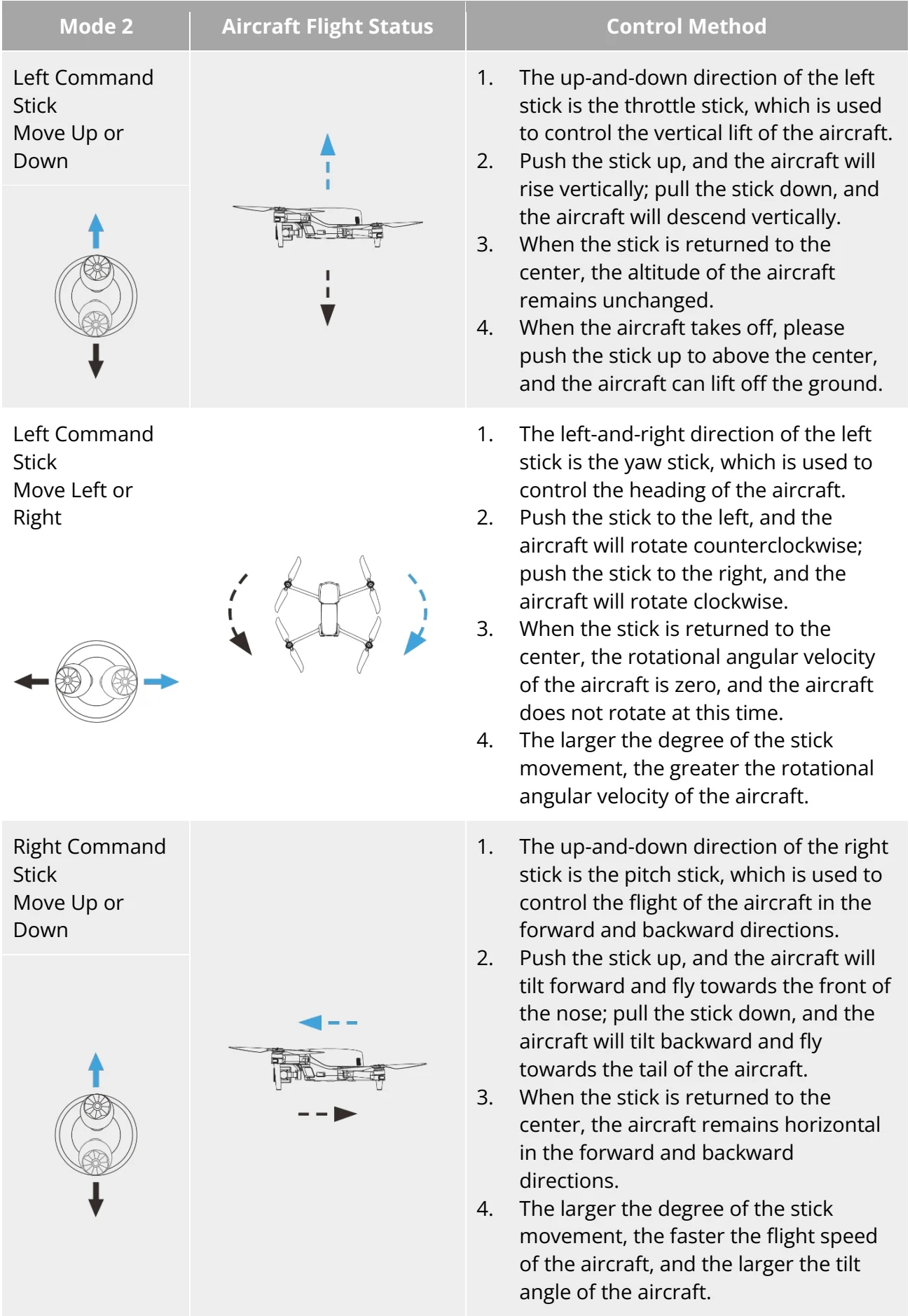
The default stick mode of the remote controller is "Mode 2". Its detailed responses are as follows. For operation responses of other stick mode, you can also refer to the following description.

[PDF page 81, block 15](https://shop.skyflow.ca/learn/autel/evo-lite-enterprise/manuals/evo-lite-640t-v1-0-2/4-10-selecting-stick-mode#p81-b15)

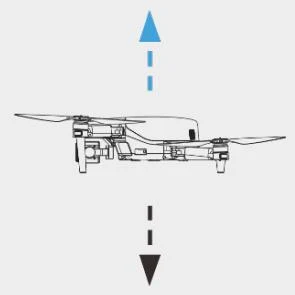
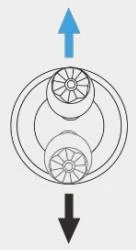
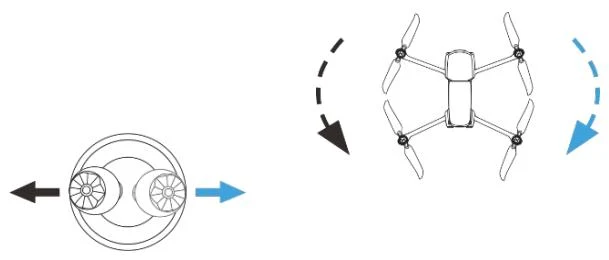
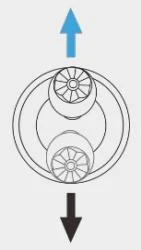
<table><tr><td>Mode 2</td><td>Aircraft Flight Status</td><td>Control Method</td></tr><tr><td>Left Command StickMove Up or Down</td><td rowspan="2"><img src="https://shop.skyflow.ca/manuals/evo-lite-640t-v1-0-2/22221ddbdb604d1d2199c5a6.webp" alt="Manufacturer diagram or control symbol" loading="lazy"></td><td rowspan="2">1. The up-and-down direction of the left stick is the throttle stick, which is used to control the vertical lift of the aircraft.2. Push the stick up, and the aircraft will rise vertically; pull the stick down, and the aircraft will descend vertically.3. When the stick is returned to the center, the altitude of the aircraft remains unchanged.4. When the aircraft takes off, please push the stick up to above the center, and the aircraft can lift off the ground.</td></tr><tr><td><img src="https://shop.skyflow.ca/manuals/evo-lite-640t-v1-0-2/06ba8277507ca6567bffbe28.webp" alt="Manufacturer diagram or control symbol" loading="lazy"></td></tr><tr><td>Left Command StickMove Left or Right</td><td><img src="https://shop.skyflow.ca/manuals/evo-lite-640t-v1-0-2/f30f0902da76c4c32db2e0de.webp" alt="Manufacturer diagram or control symbol" loading="lazy"></td><td>1. The left-and-right direction of the left stick is the yaw stick, which is used to control the heading of the aircraft.2. Push the stick to the left, and the aircraft will rotate counterclockwise; push the stick to the right, and the aircraft will rotate clockwise.3. When the stick is returned to the center, the rotational angular velocity of the aircraft is zero, and the aircraft does not rotate at this time.4. The larger the degree of the stick movement, the greater the rotational angular velocity of the aircraft.</td></tr><tr><td><img src="https://shop.skyflow.ca/manuals/evo-lite-640t-v1-0-2/592c40e5abe103461b421ad2.webp" alt="Manufacturer diagram or control symbol" loading="lazy"></td><td><img src="https://shop.skyflow.ca/manuals/evo-lite-640t-v1-0-2/6b183fd5a413ace2615abb27.webp" alt="Manufacturer diagram or control symbol" loading="lazy"></td><td>1. The up-and-down direction of the right stick is the pitch stick, which is used to control the flight of the aircraft in the forward and backward directions.2. Push the stick up, and the aircraft will tilt forward and fly towards the front of the nose; pull the stick down, and the aircraft will tilt backward and fly towards the tail of the aircraft.3. When the stick is returned to the center, the aircraft remains horizontal in the forward and backward directions.4. The larger the degree of the stick movement, the faster the flight speed of the aircraft, and the larger the tilt angle of the aircraft.</td></tr></table>

![Table 4-13 Default Control Mode (Mode 2)](https://shop.skyflow.ca/manuals/evo-lite-640t-v1-0-2/bb2cdedf2ace080833c8e73c.webp)

[PDF page 82, block 3](https://shop.skyflow.ca/learn/autel/evo-lite-enterprise/manuals/evo-lite-640t-v1-0-2/4-10-selecting-stick-mode#p82-b3)

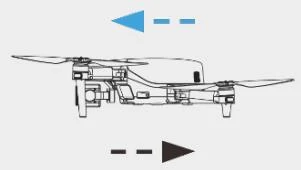
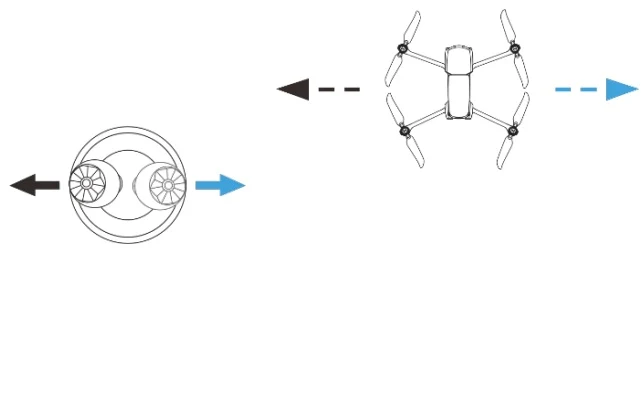
Right Command Stick Move Left or Right

[PDF page 83, block 2](https://shop.skyflow.ca/learn/autel/evo-lite-enterprise/manuals/evo-lite-640t-v1-0-2/4-10-selecting-stick-mode#p83-b2)

4.10  Selecting Stick Mode — manufacturer illustration
![4.10  Selecting Stick Mode — manufacturer illustration](https://shop.skyflow.ca/manuals/evo-lite-640t-v1-0-2/66c7b80c646f6e6d03f4f524.webp)

[PDF page 83, block 3](https://shop.skyflow.ca/learn/autel/evo-lite-enterprise/manuals/evo-lite-640t-v1-0-2/4-10-selecting-stick-mode#p83-b3)

1. The left-and-right direction of the right stick is the roll stick, which is used to control the flight of the aircraft in the left and right directions.

[PDF page 83, block 4](https://shop.skyflow.ca/learn/autel/evo-lite-enterprise/manuals/evo-lite-640t-v1-0-2/4-10-selecting-stick-mode#p83-b4)

2. Push the stick to the left, and the aircraft will tilt to the left and fly to the left of the nose; pull the stick to the right, and the aircraft will tilt to the right and fly to the right of the nose.

[PDF page 83, block 5](https://shop.skyflow.ca/learn/autel/evo-lite-enterprise/manuals/evo-lite-640t-v1-0-2/4-10-selecting-stick-mode#p83-b5)

3. When the stick is returned to the center, the aircraft remains horizontal in the left and -right directions.

[PDF page 83, block 6](https://shop.skyflow.ca/learn/autel/evo-lite-enterprise/manuals/evo-lite-640t-v1-0-2/4-10-selecting-stick-mode#p83-b6)

4. The larger the degree of the stick movement, the faster the flight speed of the aircraft, and the larger the tilt angle of the aircraft.

[PDF page 83, block 7](https://shop.skyflow.ca/learn/autel/evo-lite-enterprise/manuals/evo-lite-640t-v1-0-2/4-10-selecting-stick-mode#p83-b7)

4.10  Selecting Stick Mode — manufacturer illustration

![4.10  Selecting Stick Mode — manufacturer illustration](https://shop.skyflow.ca/manuals/evo-lite-640t-v1-0-2/8947f5dc92551ed7afecf95b.webp)

[PDF page 83, block 8](https://shop.skyflow.ca/learn/autel/evo-lite-enterprise/manuals/evo-lite-640t-v1-0-2/4-10-selecting-stick-mode#p83-b8)

## Remarks

[PDF page 83, block 9](https://shop.skyflow.ca/learn/autel/evo-lite-enterprise/manuals/evo-lite-640t-v1-0-2/4-10-selecting-stick-mode#p83-b9)

When controlling the aircraft for landing, pull the throttle stick down to its lowest position. In this case, the aircraft will descend to an altitude of 1.2 meter above the ground, and then it will perform an assisted landing and automatically descend slowly.

[PDF page 83, block 10](https://shop.skyflow.ca/learn/autel/evo-lite-enterprise/manuals/evo-lite-640t-v1-0-2/4-10-selecting-stick-mode#p83-b10)

## 4.10.3  Starting/Stopping the Aircraft Power Motor

[PDF page 83, block 11](https://shop.skyflow.ca/learn/autel/evo-lite-enterprise/manuals/evo-lite-640t-v1-0-2/4-10-selecting-stick-mode#p83-b11)

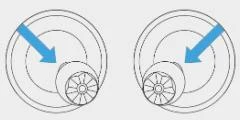
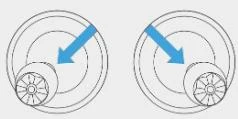
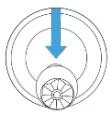
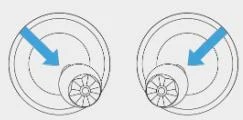
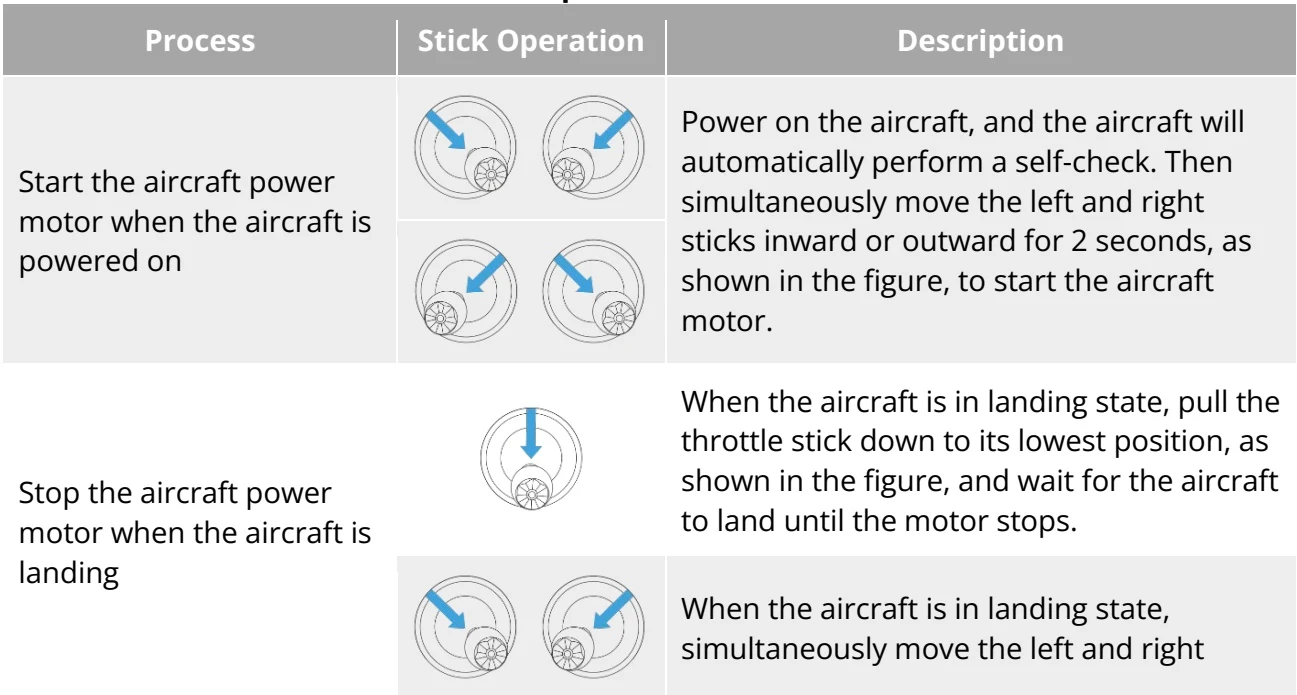
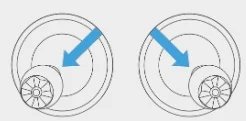
<table><tr><td>Process</td><td>Stick Operation</td><td>Description</td></tr><tr><td rowspan="2">Start the aircraft power motor when the aircraft is powered on</td><td><img src="https://shop.skyflow.ca/manuals/evo-lite-640t-v1-0-2/86963b8e023eaa58f31ae9e1.webp" alt="Manufacturer diagram or control symbol" loading="lazy"></td><td rowspan="2">Power on the aircraft, and the aircraft will automatically perform a self-check. Then simultaneously move the left and right sticks inward or outward for 2 seconds, as shown in the figure, to start the aircraft motor.</td></tr><tr><td><img src="https://shop.skyflow.ca/manuals/evo-lite-640t-v1-0-2/f9706f8fcb307e142dca967d.webp" alt="Manufacturer diagram or control symbol" loading="lazy"></td></tr><tr><td rowspan="2">Stop the aircraft power motor when the aircraft is landing</td><td><img src="https://shop.skyflow.ca/manuals/evo-lite-640t-v1-0-2/b83c34a7e7a8468d114a0436.webp" alt="Manufacturer diagram or control symbol" loading="lazy"></td><td>When the aircraft is in landing state, pull the throttle stick down to its lowest position, as shown in the figure, and wait for the aircraft to land until the motor stops.</td></tr><tr><td><img src="https://shop.skyflow.ca/manuals/evo-lite-640t-v1-0-2/640e72a93f485313011f8c59.webp" alt="Manufacturer diagram or control symbol" loading="lazy"></td><td>When the aircraft is in landing state, simultaneously move the left and right</td></tr></table>

![Table 4-14 Start/Stop the Aircraft Power Motor](https://shop.skyflow.ca/manuals/evo-lite-640t-v1-0-2/7a871121b179d2d1939da399.webp)

[PDF page 83, block 13](https://shop.skyflow.ca/learn/autel/evo-lite-enterprise/manuals/evo-lite-640t-v1-0-2/4-10-selecting-stick-mode#p83-b13)

4.10  Selecting Stick Mode — manufacturer illustration
![4.10  Selecting Stick Mode — manufacturer illustration](https://shop.skyflow.ca/manuals/evo-lite-640t-v1-0-2/09170cc867cfcc0faa2960df.webp)

[PDF page 84, block 2](https://shop.skyflow.ca/learn/autel/evo-lite-enterprise/manuals/evo-lite-640t-v1-0-2/4-10-selecting-stick-mode#p84-b2)

sticks inward or outward, as shown in the figure, until the motor stops.

[PDF page 84, block 3](https://shop.skyflow.ca/learn/autel/evo-lite-enterprise/manuals/evo-lite-640t-v1-0-2/4-10-selecting-stick-mode#p84-b3)

<ul><li>When taking off and landing the aircraft, stay away from people, vehicles, and other moving objects.</li><li>The aircraft will initiate a forced landing in case of sensor anomalies or critically low battery levels.</li></ul>

![Manufacturer note](https://shop.skyflow.ca/manuals/evo-lite-640t-v1-0-2/05753127722abcb96bd92da9.webp)

[PDF page 84, block 4](https://shop.skyflow.ca/learn/autel/evo-lite-enterprise/manuals/evo-lite-640t-v1-0-2/4-10-selecting-stick-mode#p84-b4)