# 4.4 Turning the Remote Controller On/Off
Model: lite-640t · Manual v1.0.2
Canonical: https://shop.skyflow.ca/learn/autel/evo-lite-enterprise/manuals/evo-lite-640t-v1-0-2/4-4-turning-the-remote-controller-on-off
Source: https://drive.google.com/file/d/1yQTDKasKxbvfVdANOx9bmlPYml-2dkCE/view
Updated: 2026-10-17
EVO Lite 640T Enterprise · SE V2 controller
## Turning the Remote Controller On
[PDF page 71, block 10](https://shop.skyflow.ca/learn/autel/evo-lite-enterprise/manuals/evo-lite-640t-v1-0-2/4-4-turning-the-remote-controller-on-off#p71-b10)
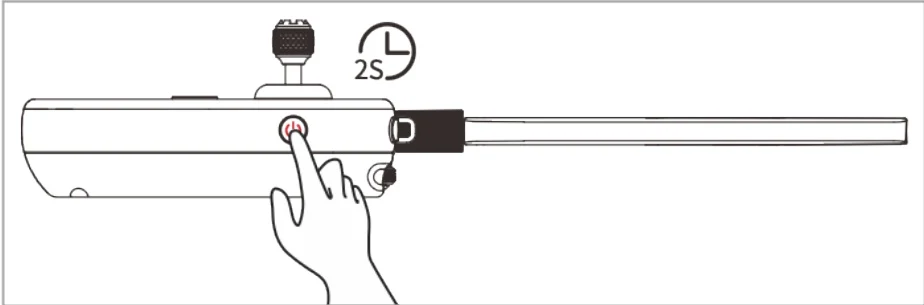
Press and hold the power button at the right side of the remote controller for 2 seconds until the controller emits a "beep" sound to turn it on.
[PDF page 71, block 11](https://shop.skyflow.ca/learn/autel/evo-lite-enterprise/manuals/evo-lite-640t-v1-0-2/4-4-turning-the-remote-controller-on-off#p71-b11)
Turning the Remote Controller On
[PDF page 71, block 12](https://shop.skyflow.ca/learn/autel/evo-lite-enterprise/manuals/evo-lite-640t-v1-0-2/4-4-turning-the-remote-controller-on-off#p71-b12)
- When using a brand-new remote controller for the first time, please follow the on-screen instructions to complete the relevant setup.

[PDF page 71, block 14](https://shop.skyflow.ca/learn/autel/evo-lite-enterprise/manuals/evo-lite-640t-v1-0-2/4-4-turning-the-remote-controller-on-off#p71-b14)
## Turning the Remote Controller Off
[PDF page 71, block 15](https://shop.skyflow.ca/learn/autel/evo-lite-enterprise/manuals/evo-lite-640t-v1-0-2/4-4-turning-the-remote-controller-on-off#p71-b15)
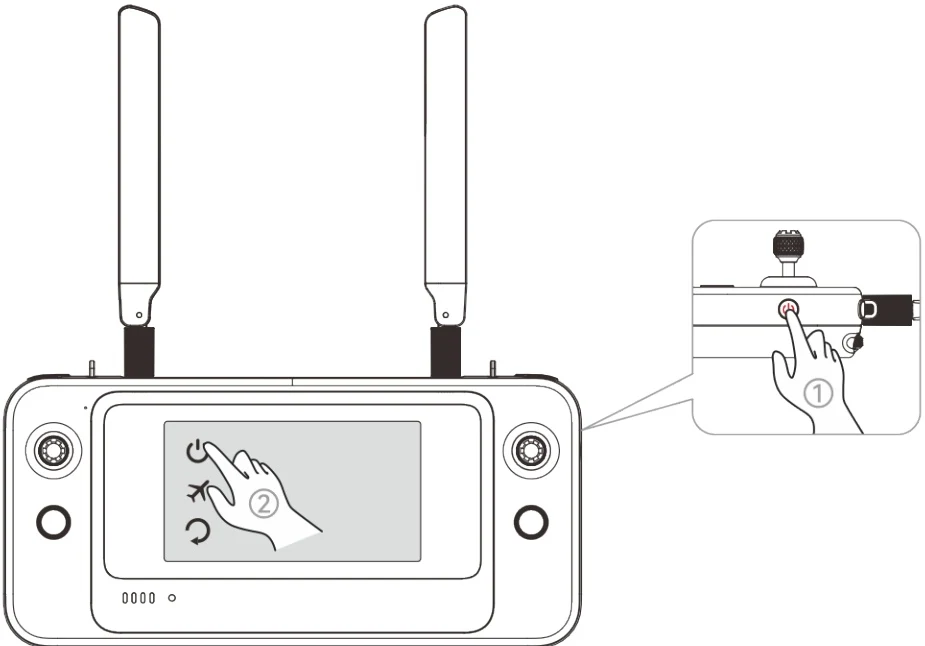
When the remote controller is on, press and hold the power button at the right side of the remote controller until the "Power off", ”Airplane mode”, and "Restart" icons appear at the top
[PDF page 71, block 16](https://shop.skyflow.ca/learn/autel/evo-lite-enterprise/manuals/evo-lite-640t-v1-0-2/4-4-turning-the-remote-controller-on-off#p71-b16)
of the controller's screen. Tapping the "Power off" icon will turn off the remote controller. Tapping the "Restart" icon will restart the remote controller.
[PDF page 72, block 2](https://shop.skyflow.ca/learn/autel/evo-lite-enterprise/manuals/evo-lite-640t-v1-0-2/4-4-turning-the-remote-controller-on-off#p72-b2)
Turning the Remote Controller Off
[PDF page 72, block 3](https://shop.skyflow.ca/learn/autel/evo-lite-enterprise/manuals/evo-lite-640t-v1-0-2/4-4-turning-the-remote-controller-on-off#p72-b3)
- When the remote controller is on, you can press and hold the power button at the right of the remote controller for 6seconds to forcibly turn it off.

[PDF page 72, block 5](https://shop.skyflow.ca/learn/autel/evo-lite-enterprise/manuals/evo-lite-640t-v1-0-2/4-4-turning-the-remote-controller-on-off#p72-b5)