
2.15.1 Pre-flight inspection checklist
PDF p. 42Before every flight operation, perform a comprehensive pre-flight check by following these steps to ensure safe flight: PDF p. 42
Ensure the RC and the aircraft have sufficient battery power, and the aircraft battery is securely installed with the battery unlock button in the locked position. PDF p. 42
Ensure the aircraft propellers are securely installed without damage or deformation, the motor and propeller surfaces are clean and free of foreign objects, and the propellers and arms are in fully extended positions. PDF p. 42
Ensure there are no foreign objects, dirt, or fingerprints on the lenses of the aircraft's visual cameras, gimbal camera, or supplementary lights, and they are not obstructed by mounts or other accessories on the aircraft. PDF p. 42
Confirm that the gimbal protective cover has been removed, and the gimbal's three-axis movements are normal. PDF p. 42
Ensure the microSD card is inserted into the aircraft, the microSD card slot and USB-C interface are covered with the rubber protective cover to maintain product protection. PDF p. 42
Ensure that the RC antenna is tightened securely and expanded to the optimal angle. PDF p. 42
Place the aircraft in an open and level outdoor area, ensuring there are no obstacles, buildings, trees, etc. Stand at least 5 meters away from the rear of the aircraft. PDF p. 42
Ensure the aircraft powers on and is connected to the RC, and the aircraft motors and gimbal camera are functioning properly. PDF p. 42
Confirm that the aircraft and RC have been upgraded to the latest versions as prompted. PDF p. 42
Address all warnings and errors displayed on the flight application. PDF p. 42
Enter the flight application settings page to configure flight control parameters, obstacle avoidance systems, joystick modes, and other relevant flight safety parameters. Familiarize yourself with flight operations to ensure parameter settings meet your needs and guarantee flight safety. PDF p. 42
If multiple aircraft are flying simultaneously, maintain an appropriate aerial distance to prevent safety accidents. PDF p. 42
2.15.2 Basic flight procedure
PDF p. 42This aircraft provides three joystick modes: Mode 2 (USA), Mode 1 (China), and Mode 3 (Japan). Each mode has different control logic for the aircraft. The default mode is Mode 2, and users can switch modes in the flight application based on their control preferences (refer to “6.5.3 RC Settings” in Chapter 6 to swap joystick modes). The following are the basic flight operations: PDF p. 42
Place the aircraft in an open and level outdoor area, ensuring no obstacles are present. PDF p. 43
Long-press the RC power button for 2 seconds to turn on the RC. PDF p. 43
Long-press the smart battery power button for 3 seconds to power on the aircraft, wait for the image transmission screen to appear on the remote controller (indicating normal status). PDF p. 43
Stand at least 5 meters away from the rear of the aircraft. PDF p. 43
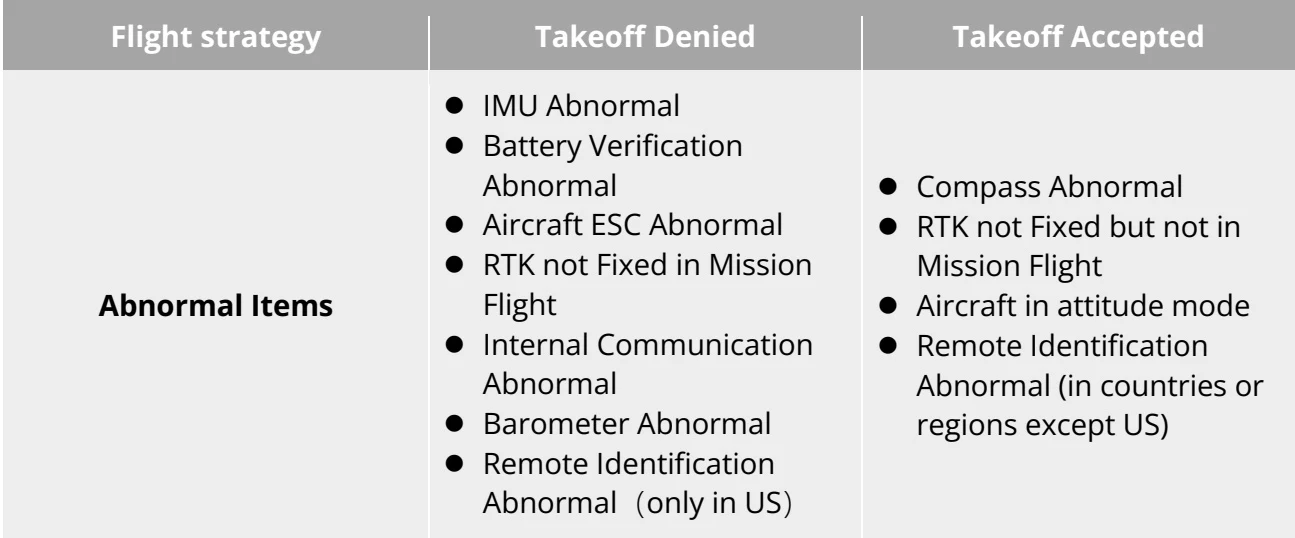
When the aircraft performs power-on self-test and any of the following situations occurs, the following strategies will be implemented to ensure flight safety. PDF p. 43
| Flight strategy | Takeoff Denied | Takeoff Accepted |
| Abnormal Items | IMU AbnormalBattery Verification AbnormalAircraft ESC AbnormalRTK not Fixed in Mission FlightInternal Communication AbnormalBarometer AbnormalRemote Identification Abnormal (only in US) | Compass AbnormalRTK not Fixed but not in Mission FlightAircraft in attitude modeRemote Identification Abnormal (in countries or regions except US) |
View the original table / diagram
2.15.3 List of Safeguard
PDF p. 43Before flight, please learn the following safeguard information, which helps you handle abnormal situations in a correct and safe way. PDF p. 43
| No. | Safety Function | Refer To |
| 1 | Auto Return Home | "2.7 Auto Return Home" in this chapter |
| 2 | Emergency Stop Propellers During Flight | "2.13Emergency Stop Propellers During Flight" in this chapter |
View the original table / diagram

2.15.4 Post-flight inspection checklist
PDF p. 43After each flight, please follow the steps below to perform a comprehensive post-flight check to ensure the safety of the UAS. PDF p. 43
After the flight, the aircraft should be landed on an open, flat, solid ground, and avoid landing on sand, wetlands, sloping ground or moving platforms. PDF p. 44
The landing point must be away from people or animal activity areas. When landing, you should maintain a horizontal distance of at least 5 meters from the landing point. PDF p. 44
After the aircraft lands, the aircraft power motor should be turned off immediately before approaching the aircraft. Before performing a visual inspection, the aircraft power should be turned off. PDF p. 44
During the visual inspection, please check the aircraft's visual obstacle avoidance lens, gimbal camera lens, and auxiliary bottom light lens to ensure that there are no foreign objects or dirt on the surface. If there is, please wipe it clean with a dry soft cloth. PDF p. 44
During the visual inspection, please check the appearance of the aircraft fuselage and the power motor to ensure that the fuselage is not damaged, cracked, or loose, and the power motor is not blocked. If there is, please stop using it and contact after-sales. PDF p. 44
Please check the propeller surface to ensure that there is no damage, looseness, deformation, etc. If there is, please replace it with a new propeller in time. PDF p. 44
Remove the smart battery from the aircraft and check whether the battery interface and appearance are abnormal. If the battery structure or interface is damaged, or there is bulging, leakage, etc., the battery should be stopped immediately and properly handled as required. PDF p. 44
After the above inspections are completed, install the gimbal protective cover for the aircraft, fold the aircraft arm as required, and store the aircraft and smart battery in the rugged case. PDF p. 44
Wipe the surface of the remote controller used clean, fold the antenna as required, and store the remote controller in the rugged case. PDF p. 44