
Before the aircraft starts to execute a mission, a pre-flight check is required. On the "Pre-flight Check" interface, you can preview the current status (such as battery level, battery temperature, and SD card memory) and route data of the aircraft and perform some settings such as flight parameters and obstacle avoidance settings. PDF p. 138
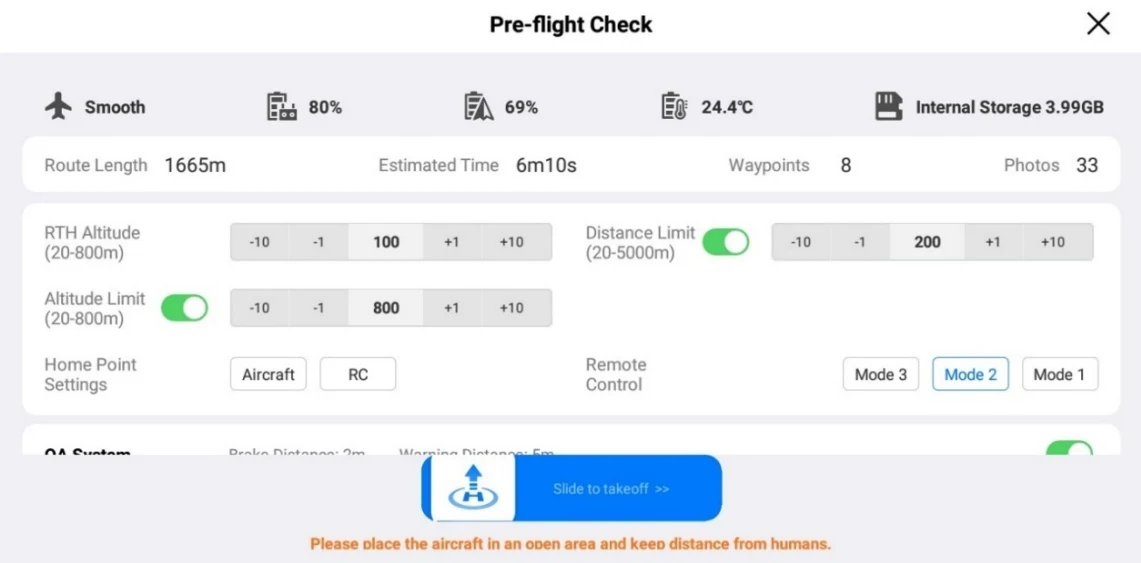
1. On the ongoing flight mission interface, tap the \because \geq n icon on the left, and the "Pre-flight Check" interface will pop up. Please make sure that there is no fault or abnormal alarm, otherwise, you need to follow the tips to solve it. PDF p. 139
2. Confirm aircraft status and route preview data. PDF p. 139
3. According to different types of flight missions, set the corresponding flight parameters. If not set, the "RTH Altitude", "Distance Limit", "Altitude Limit", "Home Point Settings", and "Remote Controller" settings are based on general settings. PDF p. 139
4. Select to enable or disable obstacle avoidance. PDF p. 139
5. After completing the above operations, press the “Slide to takeoff” icon at the bottom of the interface. PDF p. 139