EVO Lite 640T Enterprise · SE V2 controller · v1.0.2
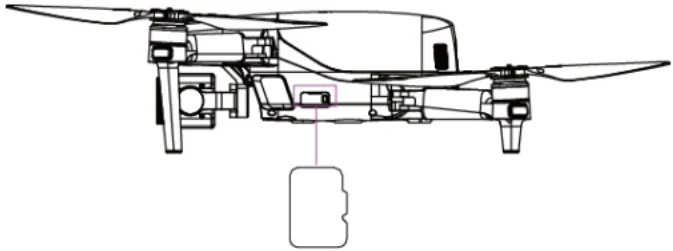
The aircraft is equipped with a 32GB microSD card slot for storage expansion (the card has been installed into the slot before the aircraft leaves the factory). If users need to replace it with a larger capacity microSD card, please follow the steps below.
install a microSD Card Manufacturer note The aircraft has internal storage of 4 GB, when the microSD card is not inserted, you can still take a single photo or record a video, and the images will be directly stored in the on-board flash memory. It is recommended that you prioritize using an external microSD card for storing the image data collected during flight to avoid running out of internal storage space, which will affect the flight safety of the aircraft. If you plan to shoot high-definition videos, we recommend using a Class 10, UHS-3, or higher microSD card, and the aircraft supports a microSD card with storage of up to 256GB. To prevent data loss, please turn off the aircraft before removing the microSD card. After installing the microSD card, close the rubber protective cover over the interface area promptly to avoid affecting the protective performance of the product. To ensure the stability of the gimbal camera system, please limit the duration of a single recording to within 30 minutes. View the original note Technical content and illustrations: Autel Robotics. Digital navigation and presentation: SkyFlow.
Source: EVO Lite Enterprise Series Aircraft User Manual v1.0.2. Physical PDF pages 60–60. Open source document