
The aircraft is equipped with an automatic return home function. If the GNSS signal is good, when the auto return home conditions are triggered, the aircraft will automatically return to the home point and land to prevent accidents. PDF p. 26
The aircraft provides users with three ways to activate the auto return home: manual activation, low battery activation, and behavior activation. PDF p. 26
Remarks
PDF p. 26If the return home point is not set in the application, the aircraft will default to the takeoff point as the return home point. PDF p. 27
During an auto-return, the control function of the remote controller for the aircraft is disabled. In this case, users can quickly press the pause button illustrated on the remote controller or press and hold it for 2 seconds to pause or exit the auto-return function, or pull the pitch stick down to exit the auto-return. After exiting the auto-return, the RC will regain control of the aircraft. For more details, please refer to “4.11.2 Takeoff/Return-to-Home button and pause button" in Chapter 4. PDF p. 27
Original instruction with its control symbol

Warning
PDF p. 27If the GNSS signal is poor, the auto return home function cannot be activated. PDF p. 27
If the obstacle avoidance system is not enabled during auto return home, the aircraft will not be able to automatically avoid obstacles. PDF p. 27
If the landing point for auto return home is not suitable for the aircraft to land (such as uneven ground or presence of a crowd), please exit the auto return home first and then manually control the aircraft to land. PDF p. 27
2.7.1 Manual activation of auto return home
PDF p. 27During flight, users can manually activate the auto return home by long-pressing the return-to-home button illustrated on the RC for 2 seconds until the RC emits a “beep” sound. PDF p. 27
Original instruction with its control symbol

2.7.2 Low battery activation of auto return home
PDF p. 27During flight, to prevent unnecessary risks due to insufficient battery power, the aircraft will intelligently assess whether the current battery level is sufficient based on the aircraft's current position. PDF p. 27
If the current battery level is only sufficient for the return home process, the flight application will display a pop-up alert saying "The remaining battery is only enough for return to Home. The aircraft will Return to Home after 10s." to remind the user whether to execute the low battery auto return home. If the user chooses to execute or does not perform any operation within 10s, the aircraft will enter low battery auto return home after 10s. PDF p. 27
If you cancel the execution and continue flying with a low battery level, when the battery level decreases to critically low battery warning threshold, the aircraft will activate a critically low battery landing. PDF p. 27
Tips
PDF p. 27Please note that besides the above intelligent low battery auto return, when the aircraft battery level decreases to the low battery warning threshold set in the flight application, the aircraft will also be triggered to return. The aircraft flight control system executes auto return no matter which one of those two scenarios occur first. PDF p. 27
When critically low battery landing is triggered, in the process of landing, users can push and pull the remote controller sticks to adjust the landing location of the aircraft. After users stop using the sticks, the aircraft will continue to land. PDF p. 28
Warning
PDF p. 28When the aircraft triggers low battery auto return home, the auto return home process should not be canceled. Otherwise, the aircraft may not have enough power to return to the home point. PDF p. 28
It is not recommended to let the aircraft enter the critically low battery landing process. When the aircraft is executing critically low battery landing, if the landing point does not meet safe landing standard, it might do not have enough power to land at safe landing site, causing damage to the aircraft. PDF p. 28
When the flight application displays relevant warning prompts, follow the corresponding instructions immediately. PDF p. 28
2.7.3 Behavior activation of auto return home
PDF p. 28During a flight mission, if “Finish Action” is set to "Auto Return", the aircraft will activate return after completing the mission; if signal lost action is set to "Auto Return", when the flight application displays a warning saying “Aircraft disconnected.”, the aircraft will activate autoreturn. For details, please refer to “6.9 Flight Missions” in chapter 6. PDF p. 28
Tips
PDF p. 28In the flight application, Lost connection action can be set to “Return to Home” by default. PDF p. 28
During a flight mission, after the aircraft is disconnected from the remote controller, the aircraft will continue to fly in the original state. It will not perform the "Signal Loss Action" until the flight application displays a warning saying “Aircraft disconnected.”. During a manual flight, after the aircraft is disconnected from the remote controller, the aircraft will slow down and hover. It will not perform "Signal Loss Action" until the flight application displays a warning saying “Aircraft disconnected.”. PDF p. 28
During the loss of connection auto return home process, if the aircraft re-establishes a connection with the RC, the aircraft will continue to execute the auto return home. PDF p. 28
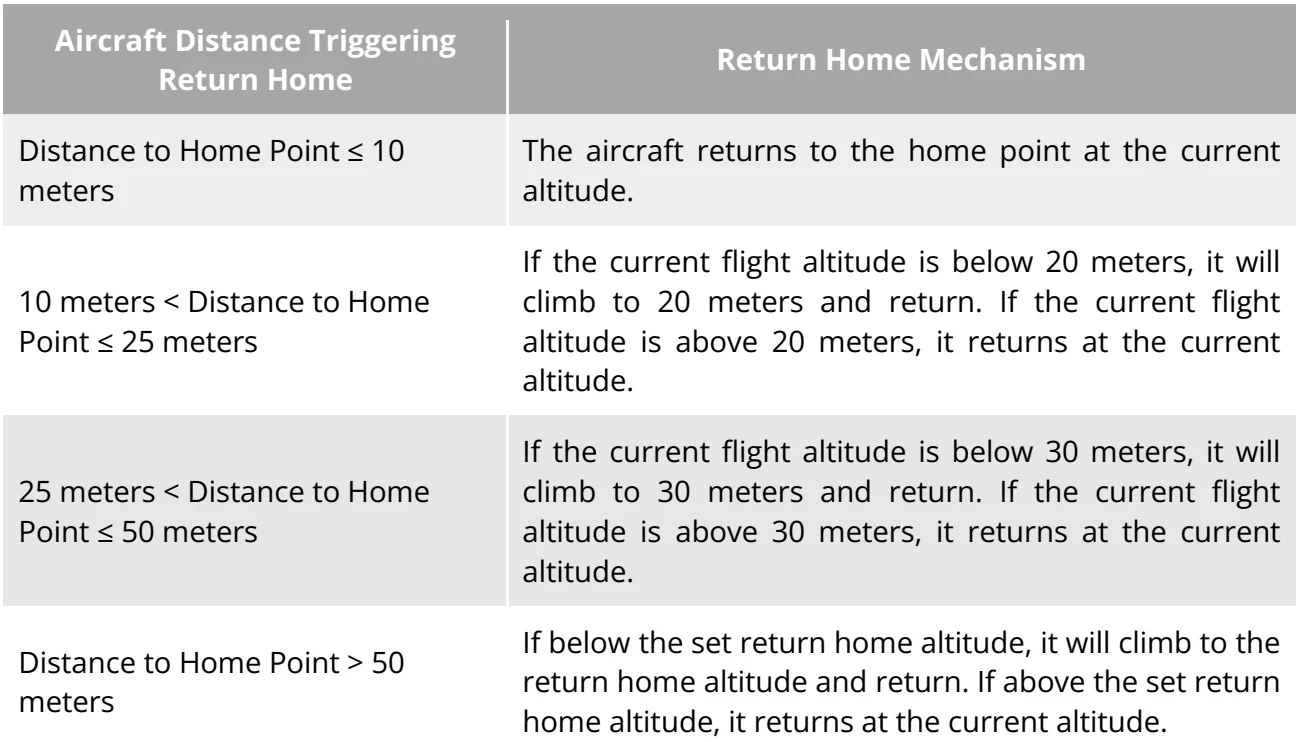
2.7.4 Auto return home mechanism
PDF p. 29| Aircraft Distance Triggering Return Home | Return Home Mechanism |
| Distance to Home Point ≤ 10 meters | The aircraft returns to the home point at the current altitude. |
| 10 meters < Distance to Home Point ≤ 25 meters | If the current flight altitude is below 20 meters, it will climb to 20 meters and return. If the current flight altitude is above 20 meters, it returns at the current altitude. |
| 25 meters < Distance to Home Point ≤ 50 meters | If the current flight altitude is below 30 meters, it will climb to 30 meters and return. If the current flight altitude is above 30 meters, it returns at the current altitude. |
| Distance to Home Point > 50 meters | If below the set return home altitude, it will climb to the return home altitude and return. If above the set return home altitude, it returns at the current altitude. |
View the original table / diagram
2.7.5 Auto return home obstacle avoidance process
PDF p. 29When the obstacle avoidance system is enabled and the lighting conditions allow the visual perception system to function, the aircraft will implement obstacle avoidance during the auto return home process as follows: PDF p. 29
During manual flight, if obstacle avoidance is enabled in “OA Settings”., in case of a lost action auto-return, low battery auto-return, or manual activation of auto-return, when an obstacle is detected in front of the aircraft, the aircraft will automatically brake within the set brake distance and hover in place, and wait for manually taking over. PDF p. 29
During flight missions, the obstacle avoidance mode is set to "Hovering". In the case of lost action auto-return, low battery auto-return, or mission completion auto-return, when an obstacle is detected in front of the aircraft, the aircraft will automatically brake within the set brake distance and hover in place, and wait for manually taking over. PDF p. 29
Important
PDF p. 30During the obstacle avoidance process, the aircraft will hover in place until a critically low battery landing is triggered. In this case, please manually take control of the aircraft in advance. PDF p. 30
Do not fly the aircraft out of visual sight range in places with serious electromagnetic environment interference, avoiding failure to manually taking over the aircraft when the aircraft encounters obstacle and brakes after the loss of connection and return is triggered. PDF p. 30
The aircraft does not support visual obstacle sensing in the direction of left, right and up. Before the flight, please plan reasonable flight altitude and choose suitable airspace for flight. PDF p. 30
During flight missions, if the obstacle avoidance mode is set to "Off", the aircraft will not have obstacle avoidance capabilities. PDF p. 30