
Propellers are consumable parts that require regular maintenance and replacement to ensure the safe flight of the aircraft. The aircraft uses a quick-release propeller design, making it easy for you to replace them. PDF p. 48
Keep body parts away from rotating propellers. PDF p. 48
3.3.1 Replacing propellers
PDF p. 48The propellers are installed in the aircraft by default at the factory, and reinstallation is not required. If the propellers are damaged (such as broken or damaged propeller blades), please replace them with new ones before a flight. PDF p. 48
Tips
PDF p. 48Aircraft propellers are consumable parts. If needed, please purchase them from Autel Robotics. PDF p. 48
The propeller model is marked on the blade. You can check the model of a propeller at the edge of the blade near the propeller center shaft. PDF p. 48
Propellers cannot be installed on the wrong propeller mounts. Please carefully distinguish between propellers and mounts. PDF p. 48
Detaching the Propellers
PDF p. 481. Press and hold the smart battery power button for 3 seconds to power off the aircraft. PDF p. 48
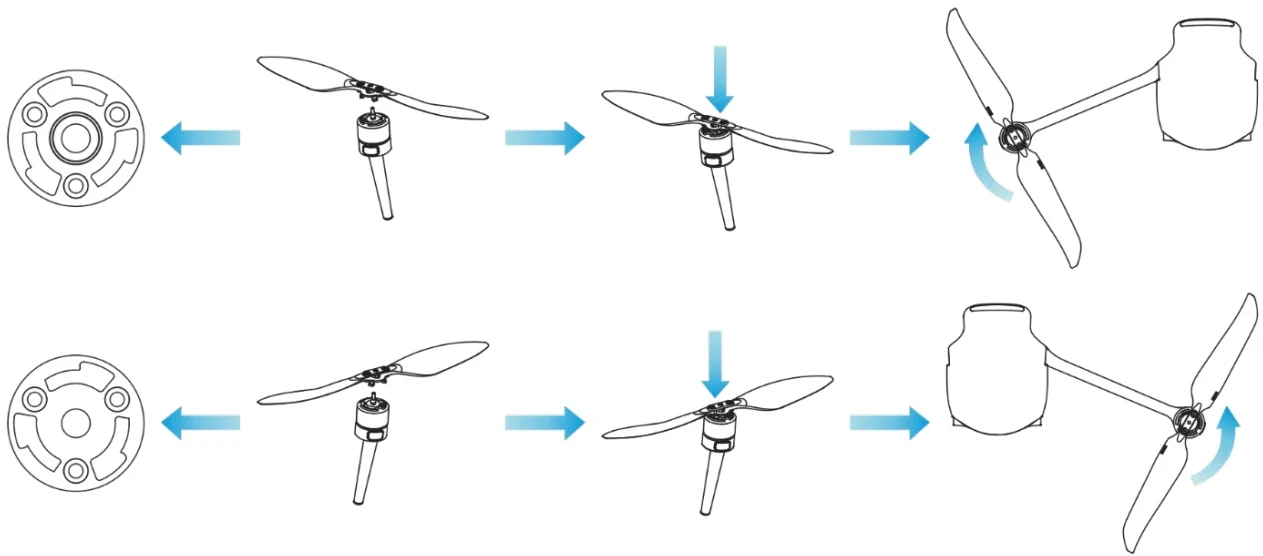
2. First hold the motor on the arm below the propeller to prevent it from rotating, press down on the propeller center shaft firmly, and then turn it in the unlocking direction to detach the propeller. PDF p. 48
Installing the Propellers
PDF p. 49When installing the propellers, strictly follow the following instructions: PDF p. 49
1. Make sure that the aircraft is powered off before installing the propellers. PDF p. 49
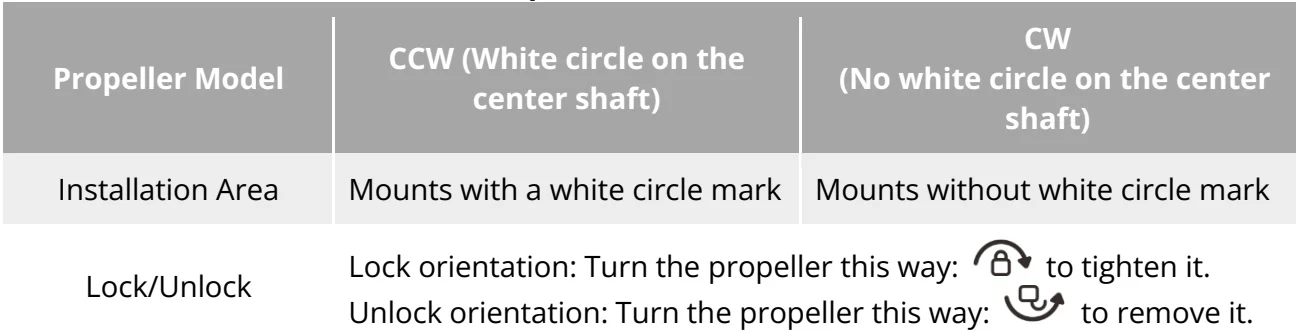
2. The aircraft needs to be installed with two models of propellers, that is, CW and CCW, with two of each model. The CCW propellers have a white circle mark at the center shaft, while the CW propellers do not have this mark at the center shaft. PDF p. 49
3. There are two types of propeller mounts on the front and rear arms of the aircraft. The mounts with a white circle mark at the center shaft are for CCW propellers, while the mounts without this mark are for CW propellers. PDF p. 49
4. Place a propeller on the corresponding propeller mount. Make sure that the buckle at the center shaft of the propeller aligns with the slot on the mount. Hold the motor on the arm below the propeller to prevent it from rotating, press down on the propeller center shaft firmly, and then turn it in the locking direction marked on the center shaft to secure the propeller in place. PDF p. 49
| Propeller Model | CCW (White circle on the center shaft) | CW(No white circle on the center shaft) |
| Installation Area | Mounts with a white circle mark | Mounts without white circle mark |
| Lock/Unlock | Lock orientation: Turn the propeller this way:  to tighten it.Unlock orientation: Turn the propeller this way: to tighten it.Unlock orientation: Turn the propeller this way:  to remove it. to remove it. | |
View the original table / diagram
Please use the propellers provided by Autel Robotics. Do not mix propellers of different models. PDF p. 50
Before replacing propellers, make sure that the aircraft is powered off. PDF p. 50
Propeller edges are sharp. When replacing propellers, it is recommended to wear protective gloves. PDF p. 50
Stay away from rotating propellers or power motors to avoid injuries. PDF p. 50
Before testing the aircraft on the ground, make sure that the propellers are removed. PDF p. 50
3.3.2 Storing propellers
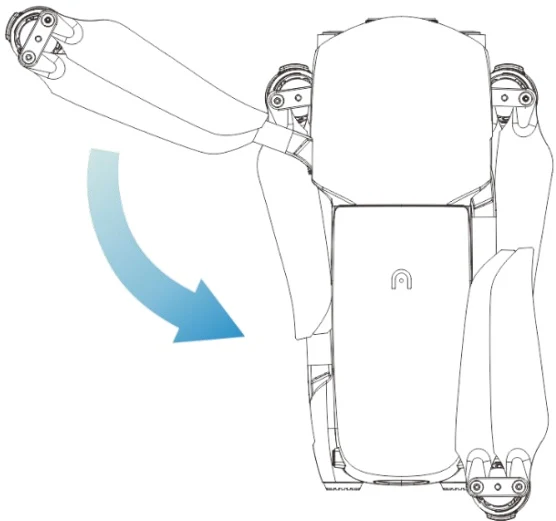
PDF p. 50After using the aircraft, fold the arms as shown below and store the propellers in the rugged case. PDF p. 50
Important
PDF p. 50Before folding the arms, you should turn off the power of the aircraft. Store the propeller, fold the rear arms first, and then fold the front arms. PDF p. 50