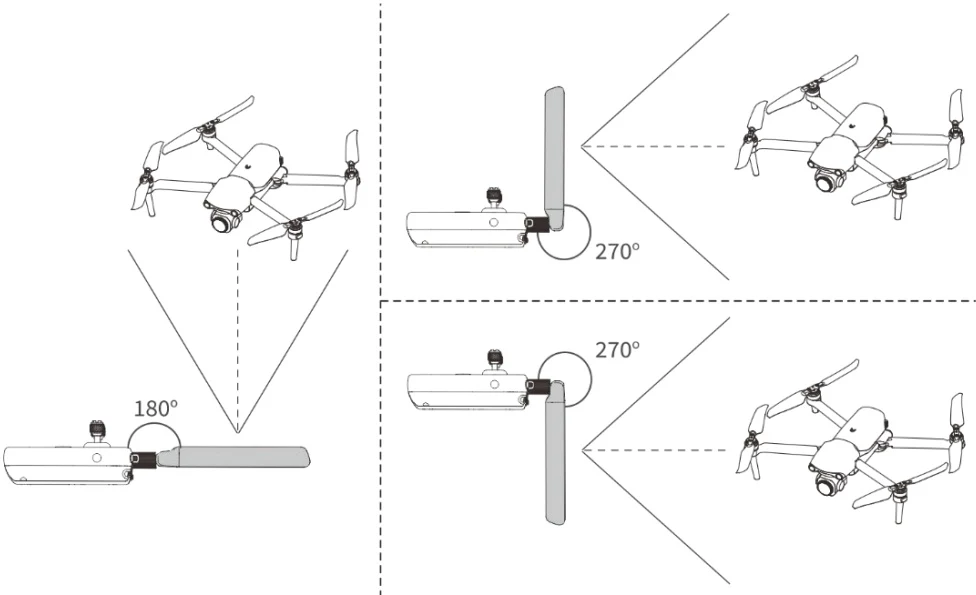
During flight, please extend the antenna of the remote controller and adjust it to an appropriate position. The strength of the signal received by the antenna varies depending on its position. PDF p. 74
When the angle between the antenna and the back of the remote controller is 1 8 0 ^ { \circ } or 2 7 0 ^ { \circ } , and the plane of the antenna faces the aircraft, the signal quality between the remote controller and the aircraft can reach its best state. PDF p. 75
Important
PDF p. 75When you operate the aircraft, make sure that the aircraft is in the place for the best communications. PDF p. 75
Do not use other communication devices of the same frequency band at the same time to prevent interference with the signals of the remote controller. PDF p. 75
During flight, if there is a poor image transmission signal between the aircraft and the remote controller, the remote controller will provide a prompt. Please adjust the antenna orientation according to the prompt to ensure that the aircraft is in the optimal data transmission range. PDF p. 75
Please ensure the RC antenna is securely tightened. If the antenna is not securely tightened, please rotate the antenna connector clockwise until it is secured. PDF p. 75